Blog
Get comprehensive visibility of cloud entitlements with SailPoint CIEM and AWS IAM account access manager integration
As cloud adoption accelerates, managing entitlements for access to AWS environments is of critical importance from a security and governance perspective. AWS IAM account access manager offers a centralized service for managing workforce access to AWS accounts by mapping identities to IAM roles across an organization. By integrating AWS IAM account access manager with SailPoint’s Cloud Infrastructure Entitlement Management (CIEM), organizations can gain robust visibility, automated control, and adherence to the principle of least privilege across their AWS identities and resources. As organizations rapidly adopt generative AI, this visibility becomes crucial for AI governance. CIEM automatically collects AI-specific cloud resources, allowing you to govern human access to sensitive assets like Amazon Bedrock AI Agents and Bedrock AgentCore infrastructure just as easily as traditional cloud workloads. This technical guide outlines the integration process, highlights the visualizations provided by SailPoint CIEM, and details the significant benefits of this combined approach for managing cloud entitlements.This feature will soon be available in SailPoint Human Fabric. If you are interested in utilizing it, please reach out to the SailPoint team.
Prerequisites and considerations
Before proceeding with the AWS IAM account access manager and SailPoint CIEM setup, ensure your environment meets the following requirements to successfully leverage its full capabilities:
| Requirement/Consideration | Details and notes |
|---|---|
| Organizational instance type | SailPoint CIEM’s AWS connector supports organization instances of AWS IAM Identity Center. Account instances are not supported. AWS IAM account access manager is enabled on that organization's IAM Identity Center setup and is used to assign users and groups to IAM roles across the AWS Organization. |
| Existing SaaS tenant | You will need an existing tenant with the CIEM product enabled. |
| External IdP configuration | If using an external IdP such as Microsoft Entra or Okta, leave “Provision Identity Center” disabled and instead provision those entitlements through the external IdP’s connector. |
Walkthrough: Integrating and configuring SailPoint CIEM with AWS IAM account access manager
This covers the end-to-end process of setting up the CIEM AWS connector, automating your AWS environment configuration, and connecting SailPoint CIEM to aggregate and interpret entitlement data for AWS IAM account access manager. AWS IAM account access manager assigns workforce users and groups from your IAM Identity Center organization instance to IAM roles across the AWS Organization.
Step 1: Create CIEM AWS source in SailPoint
Create a CIEM AWS source to get the unique external ID that will be used when creating your roles in AWS.
| Step | Action |
|---|---|
| 1 | In your tenant, create a CIEM AWS source. |
| 2 | Note the provided external ID that is unique to your tenant. |
Step 2: Automate AWS setup using CloudFormation
SailPoint simplifies the AWS-side configuration by providing AWS CloudFormation templates to automate the creation of necessary IAM roles and policies. This ensures roles are created with the required permissions for SailPoint to collect your IAM Identity Center users, AWS IAM account access manager entitlements, and the cloud resources they grant access to.
Deploying for multiple AWS accounts (Recommended: StackSet)
For organizations with multiple AWS accounts, CloudFormation StackSets offer an efficient way to deploy the required resources across your entire AWS Organization. Use CloudFormation to deploy the SailPoint provided Stack to your management account and StackSet to your member accounts. Ensure that the Stack and StackSet create roles with the same name across all of your accounts.
Verify your AWS configuration
Before proceeding, verify the created AWS resources in the AWS Console:
| Verification area | What to check |
|---|---|
| IAM > Roles | Search for the IAM role created by CloudFormation (e.g., SailPointAWSRole). Note its name and ARN. |
| Trust relationships | Confirm the principal displays the correct AWS account ID for SailPoint's CIEM universal role (e.g., 874540850173 for Commercial or 229634586956 for GovCloud) and uses SailPoint’s provided External ID. |
| Permissions | Ensure the policy allows s3:GetBucketLocation, s3:ListBucket on the CloudTrail bucket, and s3:GetObject on the S3 bucket contents. |
| CloudFormation > Stacks | Select your stack and check the Parameters tab for a summary of details. |
Step 3: Enable CIEM AWS source in SailPoint
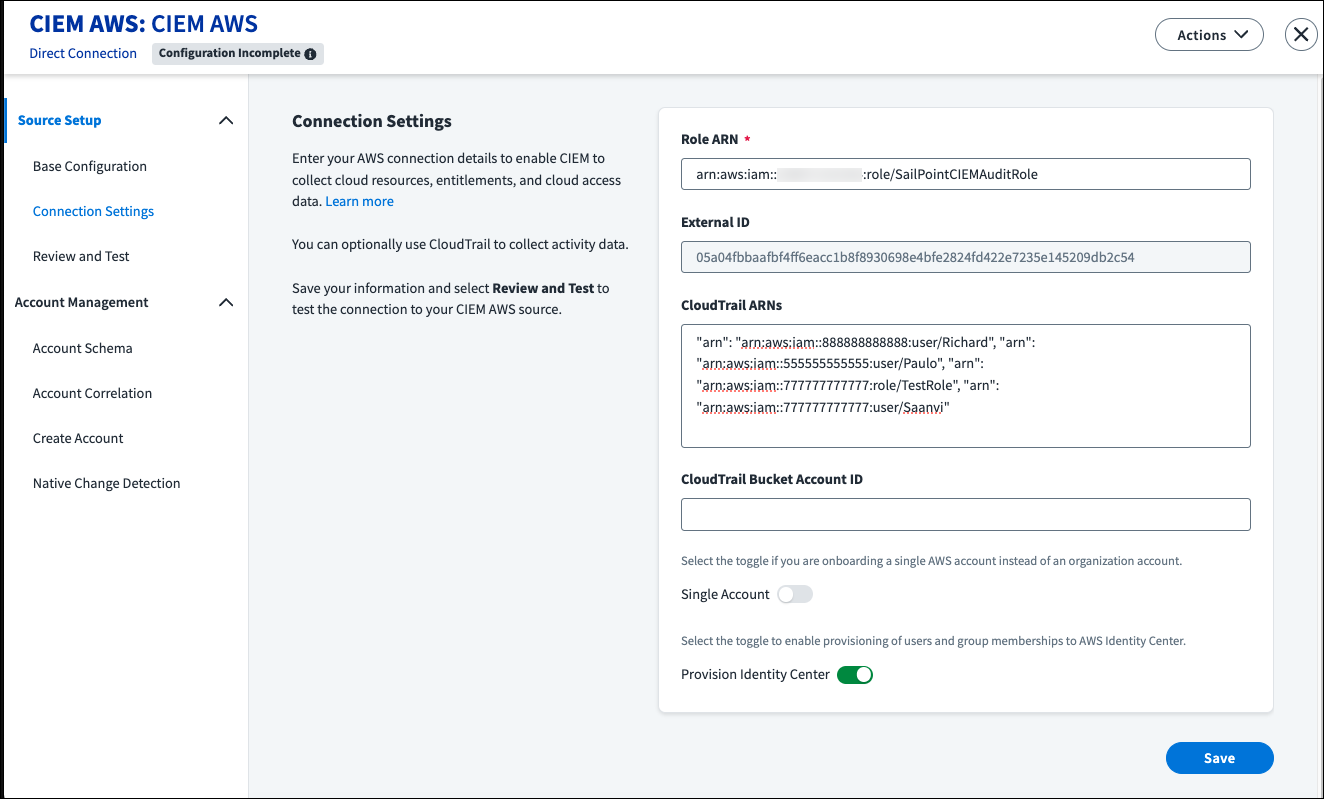
With your AWS environment configured, activate and configure CIEM within your SailPoint Human Fabric tenant. This activates the core CIEM features.
| Step | Action |
|---|---|
| 1 | In your CIEM AWS source, enter the Role ARN that was created for your management account. |
| 2 | Enter the CloudTrail ARN(s) for your organization or individual member accounts (up to 150, comma-separated). |
| 3 | Enter the AWS CloudTrail Bucket Account ID where the CloudTrail logs are stored. |
| 4 | Select Save. |
| 5 | Go to Review and Test and click on Test Connection. |
| 6 | After Test Connection is successful, go to Cloud Scopes and Regional Collection to select the AWS accounts and regions you want CIEM to collect data from. |
Step 4: Marking entitlements as "Cloud-Enabled"
To ensure SailPoint CIEM can effectively display, manage, and include your IAM roles (assigned through AWS IAM account access manager) and IAM Identity Center group entitlements in certification campaigns, you must explicitly mark them as "cloud enabled".
Configuration steps:
| Step | Action |
|---|---|
| 1 | Go to Admin > Connections > Sources. |
| 2 | Select or edit your existing CIEM AWS source. |
| 3 | In the Entitlement Management section, select Entitlement Types and Schemas. |
| 4 | Edit the entitlement types and select the Cloud Enabled checkbox for AAM Entitlement. These are the AAM Entitlements in SailPoint CIEM. |
| 5 | Select Update to save your changes. |
Step 5: Aggregating IAM Identity Center accounts and AWS IAM account access manager entitlements
After your first successful Test Connection, your CIEM AWS source can aggregate IAM Identity Center users and groups, plus the IAM role entitlements assigned through AWS IAM account access manager, into SailPoint Human Fabric.
Configuration steps:
| Step | Action |
|---|---|
| 1 | Go to Admin > Connections > Sources. |
| 2 | Select your existing CIEM AWS source. |
| 3 | In the Entitlement Aggregation section, enable an aggregation schedule or click Start Aggregation. |
| 4 | In the Account Aggregation section, enable an aggregation schedule or click Start Aggregation. |
| 5 | View aggregated accounts and entitlements in the Accounts and Entitlements sections. |
Step 6: Visualizing and managing identities in SailPoint CIEM
After successful aggregation and marking your entitlements as cloud-enabled, SailPoint CIEM displays the effective access users have to your AWS cloud resources. This includes not only traditional infrastructure, but also advanced AI resources collected during setup, such as Amazon Bedrock and AgentCore AI Agents. This centralized, identity-centric view eliminates cloud visibility blind spots, allowing security teams to enforce consistent access policies across both standard workloads and sensitive AI models.
Understanding effective access and visual paths
Once your integration is complete, SailPoint CIEM provides several ways to analyze how identities interact with your AWS environment.
Viewing Effective Access
SailPoint CIEM allows you to view the effective access that cloud-enabled entitlements provide to resources. This includes access granted through roles a user can assume, displaying resources and privileges associated with those roles, even those reachable through role chaining. This enables certifiers to view cloud access details like the last level of access and type of action taken on the resource when making access decisions during certification campaigns. By exposing this granular access data, certifiers revoke overprivileged and dormant access directly within routine campaigns, measurably reducing their organization's cloud attack surface.
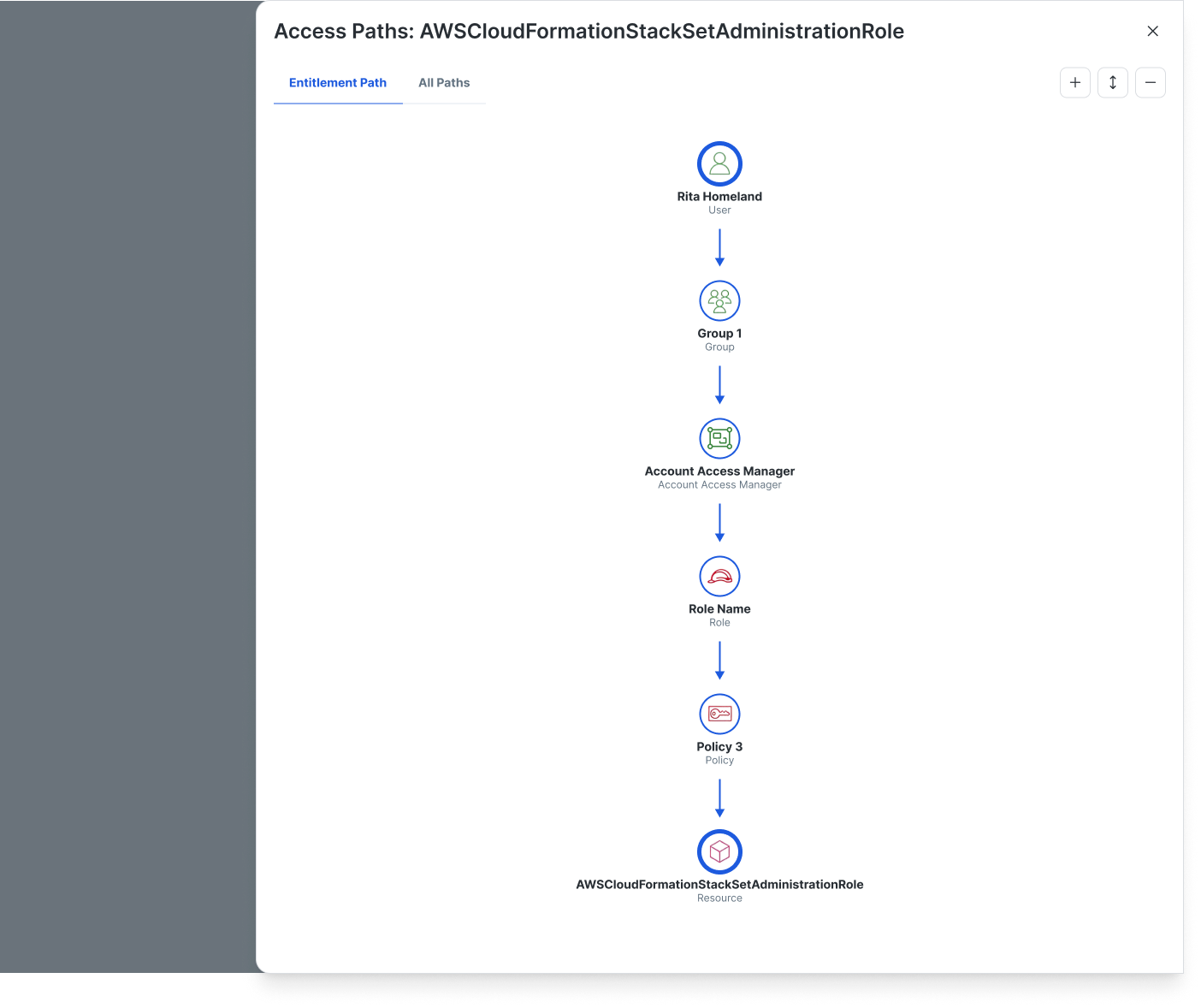
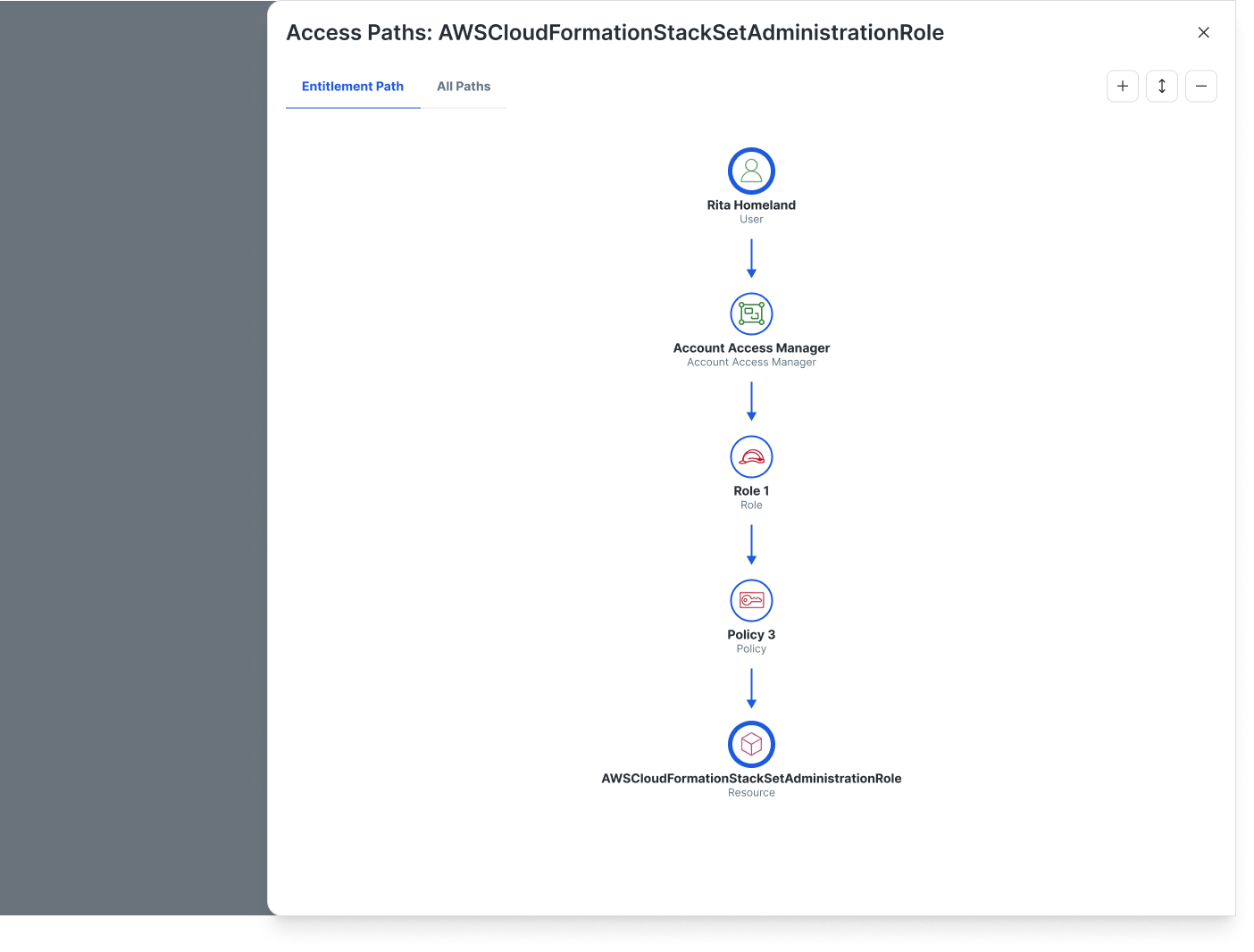
CIEM Access Graph
Provides a visual representation of the access path from the account to the entitlement, through cloud Role-Based Access Control (RBAC), to the cloud resource. You can select "View Access Paths" to see how a user can access a specified role(s) (including role chaining noted above) through a chosen entitlement, or all entitlements. This helps IAM teams understand the true source of access and right-size access models to improve security posture. For example, you can visually trace exactly how a human identity gains administrative or invocation access to a specific Bedrock AgentCore AI Agent. Security teams use these visual paths to identify and sever unintended indirect access routes, enforcing strict least privilege without disrupting business operations.
CIEM Effective Access Table
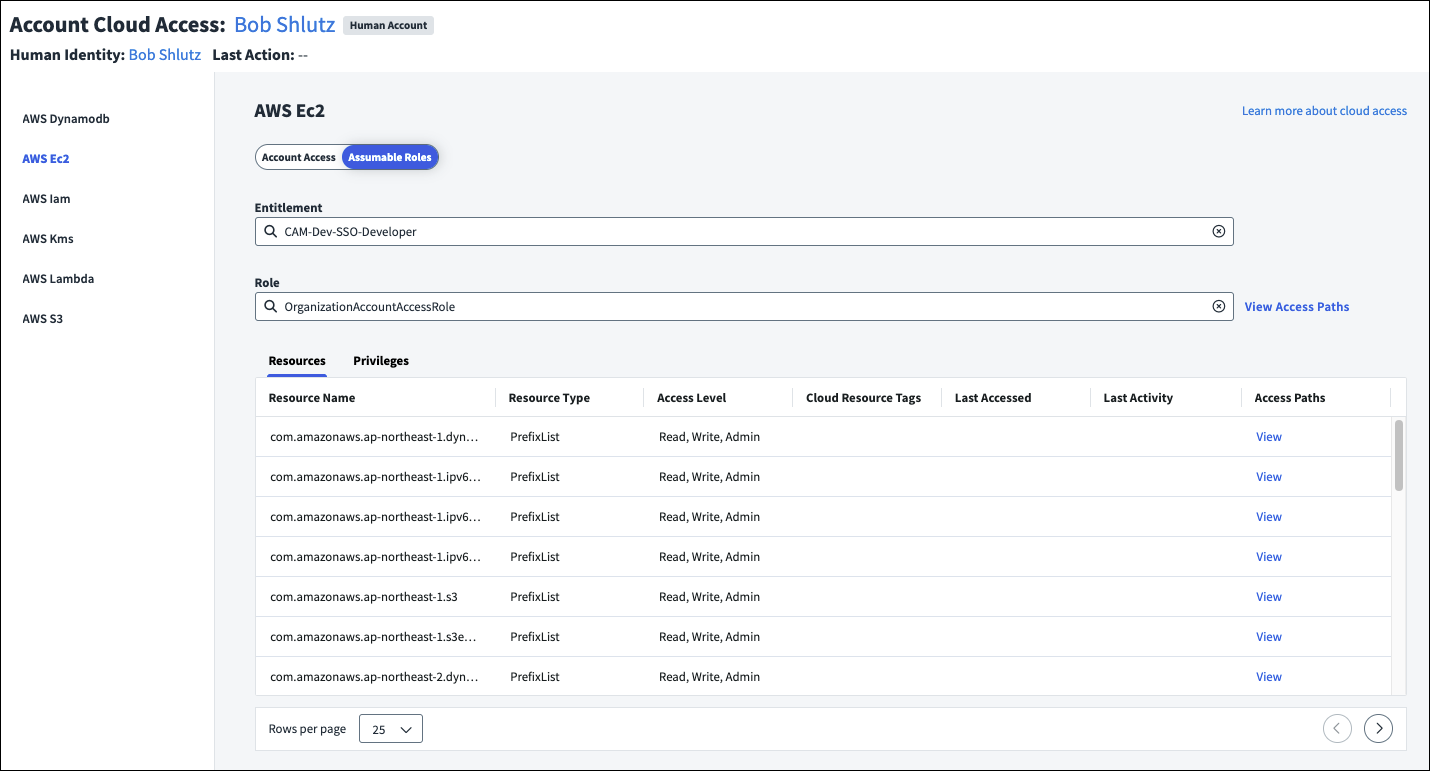
This table offers a detailed inventory of each identity’s access across cloud resources. It includes granular information such as the last activity and the specific access type (e.g., read, write, admin). Administrators utilize this inventory to rapidly audit permission usage against provisioned access, enabling the immediate removal of unused admin privileges improving security posture and accelerating compliance reporting.
How to discover and filter AWS resources using search and tags
SailPoint Human Fabric search provides quick querying by cloud resource. Administrators can immediately identify which identities can access a specific AWS resource, including all the underlying entitlements that grant that access, allowing for rapid visibility and auditing. Furthermore, because SailPoint CIEM automatically ingests AWS Tags, you can incorporate your existing cloud tagging strategy directly into your search and governance workflows.
Here is how to leverage search and AWS tags to quickly validate access:
| Step | Action |
|---|---|
| 1 | Open the Search interface within your console. |
| 2 | Construct a search query to find specific cloud resources. You can search by resource attributes or utilize tag-specific syntax. For example, to find resources tagged for production, enter: tags.key:"Environment" AND tags.value:"Prod" Alternatively, to audit human access to your AI models, search specifically for Bedrock agents: type:"AWS::Bedrock::Agent" |
| 3 | Execute the search to view all matching AWS resources and immediately see the associated identities that have access to them. |
| 4 | Select a specific resource from the results and pivot to the Effective Access Path to visually validate the specific AWS Identity Center and AWS account access manager entitlements granting access to your targeted workloads. |
By leveraging targeted search queries, security teams can reduce resource discovery time. This allows them to validate and remediate access anomalies on critical infrastructure and AI workloads, preventing potential data exposure.
How to analyze AWS entitlements using Access Intelligence Center (AIC)
Beyond real-time visibility, organizations need to track trends and identify systemic risks. By leveraging SailPoint’s built-in BI tool, the Access Intelligence Center (AIC), you can gain deeper, queryable insights into your IAM Identity Center and AWS IAM account access manager data to drive proactive remediation.
To build an analytics workflow for your AWS environment:
| Step | Action |
|---|---|
| 1 | Navigate to the Access Intelligence Center (AIC) from the main menu. |
| 2 | Open the Cloud Infrastructure Entitlement Management (CIEM) dashboard (or create a new custom dashboard). |
| 3 | Apply a global filter to isolate data specifically from your integrated IAM Identity Center and AWS IAM account access manager source. |
| 4 | Utilize the pre-built visualizations to identify high-risk areas, such as over-provisioned AccountPermissionSets, unused access patterns, and identities with excessive administrative privileges. |
| 5 | Use these insights to inform your certification campaigns and right-size AWS access models. Security and IAM teams can translate these dashboards into actionable remediation tickets, systematically eliminating unused access patterns and lowering the organization's overall identity risk score. |
Conclusion
In this post, you learned how to integrate SailPoint Cloud Infrastructure Entitlement Management with AWS IAM account access manager to gain centralized visibility and govern workforce access across your cloud environment. To establish this integration, you configured the CIEM AWS source to aggregate IAM Identity Center users and groups, and explicitly marked critical entitlements, such as IAM Role and Group, as cloud-enabled to ensure accurate so you can track and visualize the IAM roles that AWS IAM account access manager assigns.
With this integration in place, your identity and security teams gain a comprehensive, identity-centric view of effective access to your AWS resources. Administrators can now trace visual access paths from a user to a resource, and leverage search combined with ingested AWS resource tags for rapid resource discovery and access validation. This also extends robust AI governance to your environment, ensuring that human access to sensitive Amazon Bedrock AI Agents and Amazon Bedrock AgentCore Agents and connected platform components are continuously monitored and governed. Furthermore, by utilizing the Access Intelligence Center, organizations can proactively monitor unused access patterns to right-size permissions and enforce the principle of least privilege. For organizations looking to ensure maximum resilience, verify that your IAM Identity Center instance is connected to your external IdP, that AWS IAM account access manager is enabled on that instance, and consider enabling multi-region replication to maintain high availability of your identity data.
To explore the full range of cloud governance capabilities, including how to incorporate these AWS entitlements into automated certification campaigns, please reach out to the SailPoint Cloud Infrastructure Entitlement Management team and reference the AWS IAM account access manager user guide to learn more.
